Survey Builder
Build Any Survey with 35+ Question Types
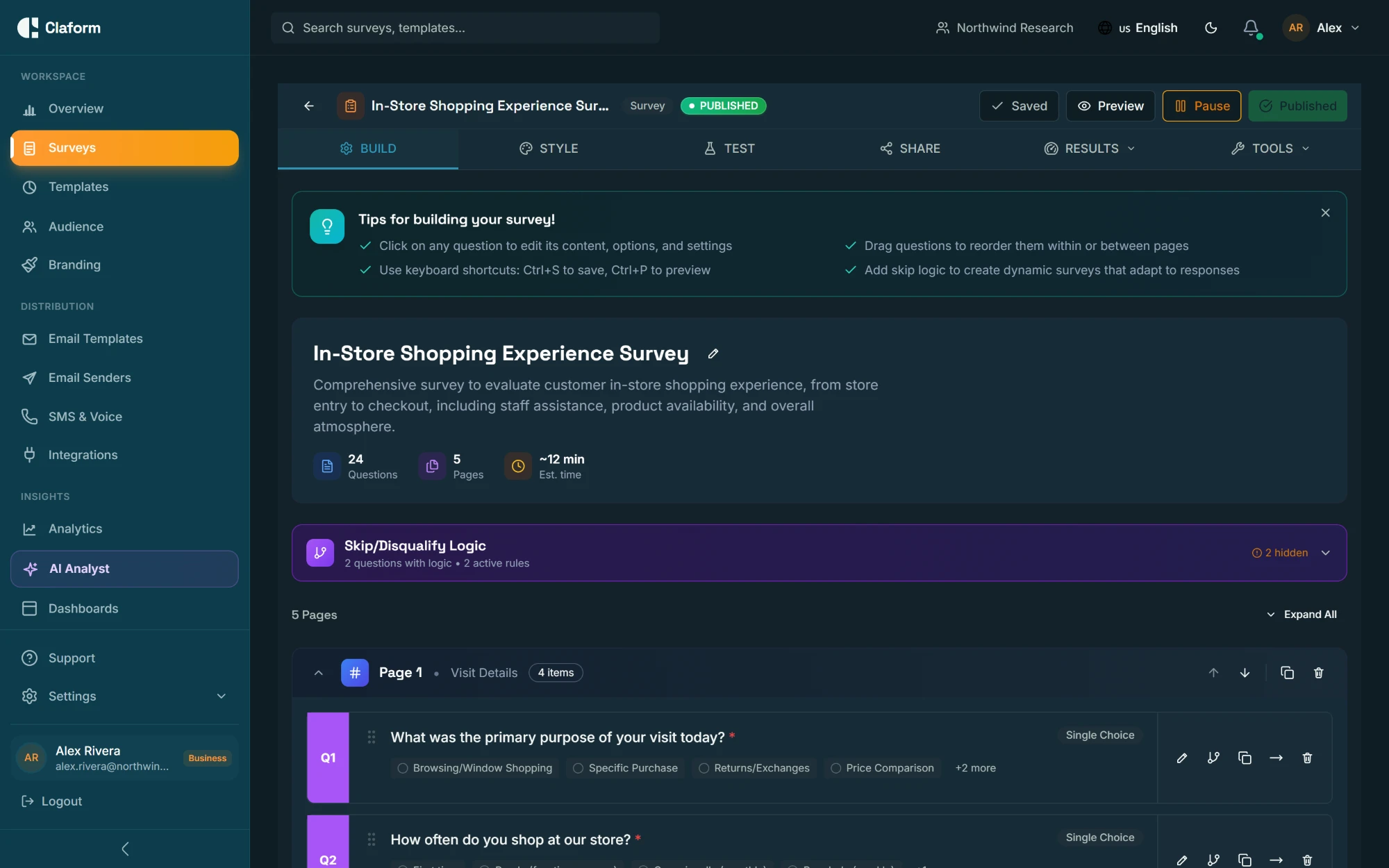
Our visual drag-and-drop editor puts the full power of professional survey design at your fingertips. Logic branching, skip patterns, answer piping, quiz scoring, 675+ templates, and support for 6 languages -- all without writing a single line of code.
Question Types
35+ Question Types Organized by Category
From simple text fields to interactive map pins and signature capture, every question type is designed to collect the right data in the right format.
Text Input
(5 types)Short Text
Single-line text for names, titles, and brief answers
Long Text
Multi-line textarea for detailed feedback and open-ended responses
Number
Numeric input with min/max validation, decimal support, and formatting
Email field with real-time format validation and domain checks
URL
Website address input with protocol validation
Choice & Selection
(5 types)Single Choice
Radio button selection with optional "Other" write-in field
Multiple Choice
Checkbox selection with min/max selection limits
Dropdown
Space-efficient single selection from a long list of options
Image Choice
Visual selection where each option is represented by an image
Ranking
Drag-to-reorder items by preference, importance, or priority
Rating & Scale
(5 types)Star Rating
Classic 1-5 or 1-10 star rating with half-star support
NPS (Net Promoter)
0-10 scale with automatic Promoter/Passive/Detractor classification
Likert Scale
Agreement scale from Strongly Disagree to Strongly Agree
Slider
Continuous or stepped slider with custom min/max and labels
Opinion Scale
Numeric scale with customizable endpoints and step intervals
Boolean & Toggle
(3 types)Yes/No
Simple binary choice presented as buttons or toggle switch
True/False
Boolean response for factual or quiz-style questions
Consent
Compliance-ready consent checkbox with linked terms and conditions
Date & Time
(4 types)Date Picker
Calendar widget with min/max date constraints and disabled dates
Time Picker
12h or 24h time selection with configurable intervals
Date-Time
Combined date and time selection in a single field
Date Range
Start and end date selection for periods and durations
Contact Information
(4 types)Full Name
First name, last name, and optional title/suffix fields
Email Address
Validated email field with domain verification
Phone Number
International phone input with country code and format validation
Contact Info
Combined name, email, phone, and company in one block
Location
(3 types)Address
Street, city, state, zip, and country with autocomplete support
Map Pinpoint
Interactive map where respondents drop a pin on a location
GPS Coordinates
Automatic latitude/longitude capture from device location
Advanced
(4 types)File Upload
Accept documents, images, or any file type with size limits
Signature
Touch or mouse-drawn signature capture with image export
Payment
Collect payments inline via Stripe integration
Matrix Grid
Multi-row, multi-column table for comparing items across criteria
Special
(4 types)Welcome Screen
Branded intro page with description, image, and start button
Thank You Page
Custom completion screen with redirect, social sharing, or score
Statement
Non-question text block for instructions, context, or dividers
Section Divider
Visual separator to organize surveys into logical groups
Smart Logic
Intelligent Surveys That Adapt in Real Time
Every respondent gets a personalized experience. Logic branching, skip patterns, piping, and randomization work together to create surveys that feel like conversations, not forms.
Conditional Logic Branching
Route respondents down different paths based on their answers. Create complex decision trees with multiple conditions per branch. Supports AND/OR logic, nested conditions, and 17 comparison operators including equals, contains, greater than, and regex matching.
Skip Patterns
Automatically skip irrelevant questions based on prior responses. Define skip-to rules at the question or page level. Respondents only see questions that apply to them, improving completion rates and data quality.
Answer Piping
Insert previous answers into question text, descriptions, or choice options. Reference any earlier response using {{question_id}} syntax. Dynamic text updates in real time as respondents progress through the survey.
Quiz Scoring
Assign point values to answers and calculate scores automatically. 8 scoring algorithms including weighted scoring, percentage-based grading, and category-based rubrics. Display results on the thank-you page or keep them internal.
Randomization
Randomize question order, choice option order, or page order to eliminate position bias. Seeded randomization (Mulberry32 PRNG) ensures consistent ordering per respondent while distributing options fairly across all respondents.
Display Logic
Show or hide questions, choices, or entire pages based on conditions. Combine multiple rules with AND/OR operators. Use display logic to create dynamic surveys that adapt in real time without requiring page reloads.
Visual Logic Flow
Our logic builder provides a visual representation of your survey flow. See exactly how respondents move through your survey based on their answers. Each branch, skip, and conditional path is clearly mapped so you can verify the experience before publishing.
- Drag-and-drop condition builder with 17 operators
- AND/OR logic with unlimited nesting depth
- Preview mode simulates every possible path
- Automatic dead-end detection warns about unreachable questions
- Export logic map for documentation and review
Templates & Library
Start Faster with 675+ Templates
Skip the blank page. Our template library covers every major use case, and the question library lets you drag in pre-built, best-practice questions.
Customer Experience
8 templates- CSAT Survey
- NPS Survey
- Post-Purchase Feedback
- Onboarding Experience
Employee Engagement
6 templates- Pulse Survey
- Annual Engagement
- Exit Interview
- 360 Review
Market Research
5 templates- Product Concept Test
- Brand Perception
- Competitive Analysis
- Pricing Study
Education
4 templates- Course Evaluation
- Student Satisfaction
- Faculty Review
- Program Assessment
Healthcare
4 templates- Patient Satisfaction
- Post-Visit Feedback
- Health Assessment
- Provider Rating
Events
3 templates- Post-Event Feedback
- Registration Form
- Speaker Evaluation
Question Library with 60+ Pre-Built Questions
Our question library contains over 60 research-backed questions crafted by survey methodology experts. Each question includes optimized wording, appropriate scale types, and validation rules. Just drag a question into your survey and customize as needed.
- Customer satisfaction (CSAT, CES, NPS)
- Employee engagement and pulse questions
- Market research and product feedback
- Demographic and firmographic fields
- Healthcare patient experience
- Education course evaluations
Customization
Your Brand, Your Surveys, Your Languages
Every survey should look and feel like your brand. Customize themes, add your logo, set custom colors, and reach global audiences in 6 languages.
Custom Themes
Design pixel-perfect surveys that match your brand identity. Set primary and secondary colors, background gradients, button styles, font families, border radius, and spacing. Save themes for reuse across all your surveys.
- Custom color palettes
- Font selection
- Button styling
- Background patterns
- CSS overrides
Brand Identity
Upload your logo, set a custom domain, and remove Claform branding entirely on Business and Enterprise plans. Every touchpoint from the survey to the thank-you page reflects your brand.
- Logo upload
- Custom domains
- White labeling
- Custom thank-you pages
- Branded email invites
6 Languages
Reach global audiences with built-in multi-language support. Create one survey and translate it into 6 languages. Automatic locale detection serves the right language to each respondent.
Editor Experience
A Builder Designed for Speed and Precision
Our drag-and-drop editor is built for survey professionals and beginners alike. Every interaction is optimized for speed without sacrificing control.
Drag & Drop
Reorder questions, move between pages, and reorganize sections with a single drag.
Live Preview
See exactly how your survey looks on desktop, tablet, and mobile in real time.
Keyboard Shortcuts
Power users can navigate, add, duplicate, and delete questions without touching the mouse.
Undo/Redo
Full undo/redo history so you can experiment freely and revert any change.
Multi-Page
Organize long surveys into pages with progress bars and navigation buttons.
Validation Rules
Set required fields, character limits, regex patterns, and custom error messages.
Inline Payments
Collect payments with Stripe integration directly inside your survey flow.
AI Suggestions
Get AI-powered recommendations for question wording, scales, and survey structure.
Start Building Your First Survey Today
Sign up for free and explore all 35+ question types, templates, and the visual editor. No credit card required, no time limit.