QR code surveys: collect feedback at the counter or event
Where to put a survey QR code, sign copy to print, the first question to ask, offline kiosk tablets and how to stop duplicate or staff-filled responses.
A QR code survey works when the sign says what you are asking and how long it takes, the code sits where people pause rather than where they walk past, and the first question takes one tap. Keep it to three questions and under a minute, print one code per location so you can compare places, and check the data for bursts of identical answers before you trust it.
This guide is for restaurants, stores, clinics and event organizers: where to place the code, what to print on the sign, what to ask first, when a kiosk tablet beats a QR code, and how to keep the results honest.
Where to put the QR code
Put the code where people pause for half a minute with a phone in hand and the experience behind them: a table after the meal, a waiting area, a checkout queue, the last slide of a session.
| Venue | Best spots | Avoid |
|---|---|---|
| Restaurant or cafe | Table card, bill folder, receipt, takeaway bag | The entrance, or the menu people scan before they eat |
| Store | Receipt, checkout counter, fitting rooms, bag insert | Shelf edges in aisles where people keep walking |
| Clinic | Checkout desk, after-visit paperwork | Exam rooms, and waiting rooms for questions about care not yet given |
| Event | Last slide of each session, back of the badge, exit doors | The registration desk, before anything has happened |
| Hotel | Room card, checkout receipt, breakfast table | Elevators and hallways |
Printing decides whether the code scans at all:
- Size. A common rule of thumb is a code at least a tenth as wide as the scanning distance: about 2.5 cm (1 inch) on a table card read from 25 cm, 10 cm on a poster read from a meter away.
- Margin. Leave a white border around the code. The QR code standard, ISO/IEC 18004, calls for a quiet zone four modules (the small squares) wide on every side.
- Contrast. Print a dark code on a light background. Inverted or pale brand colors fail on older phones.
- Logo. If you put a logo in the middle, raise the error correction level so the code still reads.
- Durability. Laminate table cards; a crease or a wet ring through the code can stop it scanning.
- Testing. Scan it with three phones, including an older Android, from where people will stand and in the venue's light.
Print one code per table, branch, room or session. It costs nothing extra and lets you compare places instead of reading one blended score.
Sign copy to print
The sign needs four things: what you are asking, how long it takes, what happens to the answers, and the code. Add a short web address under the code for people whose camera will not scan.
Restaurant table card:
How was your meal?
Scan to tell us. Three questions, under a minute. The manager on duty reads every answer today.
Store counter or receipt:
Tell us about today's visit
Scan the code: three quick questions, about 30 seconds. We use your answers to plan staffing and stock.
Clinic checkout desk:
How was your visit today?
Scan to answer three short questions. Your answers are anonymous unless you choose to leave contact details. Need help? Ask at the front desk.
Event slide:
Rate this session
Scan now, before the next talk: two questions, 20 seconds. Speakers see the results tomorrow.
Make every promise on the sign true. Write "anonymous" only if the survey collects nothing that identifies the person, and "the manager reads every answer" only if someone does. A sign that says only "We value your feedback" tells people neither what they are in for nor why it is worth their time.
What to ask first on a QR code survey
Ask first the one rating you will act on, about this visit, answerable with a single tap. At a counter, a satisfaction scale for the visit works better than a recommendation question, because people are judging what just happened.
Then stop at three questions, the last one optional. People answering a QR survey are standing, holding a bag or a child, and about to leave, so a minute is the ceiling. A set that fits:
Use skip logic so people who rated Good or Very good see "What did you like most?" instead of the fix-first question. If you want to follow up on complaints, add an optional "May we contact you about your visit?" with a phone or email field shown only to people who say yes. For longer question banks by setting, see customer satisfaction survey questions and restaurant feedback survey questions.
Kiosk tablets for walk-up feedback
Use a kiosk tablet where many people do not have a smartphone or will not use it, or where you want an answer from everyone passing one point, such as a clinic exit or a hotel lobby; use a QR code everywhere else.
| QR code | Kiosk tablet | |
|---|---|---|
| Who answers | People with a smartphone who choose to scan | Anyone passing, including people without a phone |
| Cost | Printing | A tablet, a stand, power and someone to check it daily |
| Privacy | Answered on the person's own phone | Answered in a public space |
| Connection | The respondent's mobile data | Venue Wi-Fi, or offline storage that syncs later |
| Main abuse risk | The same person scanning again | Repeat taps and staff answering for customers |
Set a kiosk up like this:
- Lock the tablet to the survey, with a PIN to exit, so nobody can browse or close it.
- Reset after every response and after a short idle time, so the next person never sees the last person's answers.
- Make the first screen the first question, with large buttons. Skip the welcome page.
- Place it on the exit path, at standing height, away from the counter and facing away from staff.
- Mount it near a socket, or charge it overnight and check it at opening.
- Plan for Wi-Fi drops: use a set-up that stores answers on the device and uploads them when the connection returns. Test it by turning Wi-Fi off, submitting three responses, turning it back on and checking that all three arrive.
- Clean the screen on a schedule, especially in clinics.
Preventing duplicate and staff-filled responses
Most bad data from QR codes and kiosks comes from incentives and targets, not from hackers: remove the reasons to fake answers, then check for the patterns fakes leave.
The reasons come first. A discount for every response invites people to scan twice. Staff bonuses or league tables built on raw scores invite staff to fill in surveys themselves or hand the tablet only to happy customers. A kiosk at the till, or a code printed where staff stand, makes both easy. So:
- Give no reward per response. If you run a prize draw, allow one entry per receipt or per email address.
- If your till can print a unique survey link per receipt, use it: one receipt, one response.
- Judge teams on trends and comments over months, never on a day's scores or on individual responses.
- Tell staff plainly that filling in customer surveys is not allowed and that you check.
Then check the data every week:
| Pattern | What it suggests | What to do |
|---|---|---|
| Several responses within a minute or two from one location | One person submitting repeatedly, or staff entering answers | Read them together; exclude clear repeats and note why |
| A burst of top scores with no comments | Staff or friends filling in | Compare with who was on shift and talk to the manager |
| Responses outside opening hours | Someone filling in after closing | Exclude them and check who had access |
| Responses per 100 transactions far above other locations | Repeat submissions | Investigate before you compare scores |
| One location far ahead in both score and count | Gaming, or a genuinely strong team | Visit before you reward or punish anyone |
Never delete suspect responses silently. Keep the raw export, record what you excluded and why, and report the count you removed.
Common mistakes
- A code on the door or the menu, scanned before the experience. Place it where the visit ends.
- A sign with no time estimate. Say "three questions, under a minute".
- An email gate or a welcome page before the first question. Start with the question.
- One code for every branch. Print one per location.
- A tiny code on a glossy receipt, never tested. Test with three phones in the venue.
- A reward for every response. It buys duplicates.
- A kiosk at the till, facing the staff. Move it to the exit path.
- Nobody reads the answers until the month ends. Send low scores to the manager on duty the same day.
Doing this in Claform
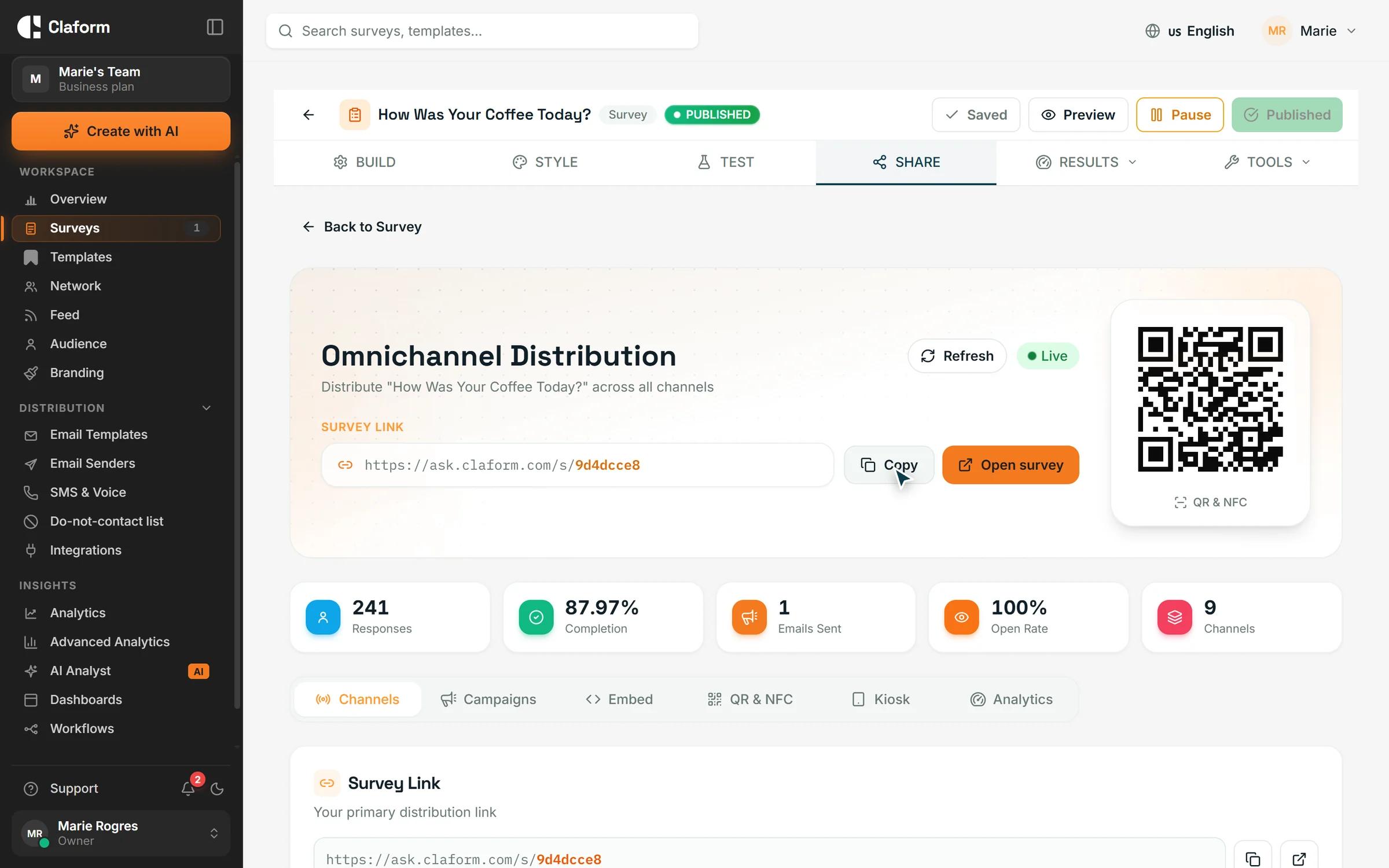
Every published Claform survey has a QR code on its Share page: set the size (including a large print size), the colors and the error correction level, then download it as PNG or SVG; the same tab gives you a link to write onto your own NFC tags. QR scans carry a source tag, so the results show how many answers came from the code, and you can create a code or link per table, room or venue and compare results by where they came from. The code points to the survey's link, so editing the survey does not break printed codes. Claform can also print a PDF of the survey with its QR code, and run the survey on a tablet in kiosk mode, which resets for the next person and locks behind a PIN; with Claform's native SDKs, a registered kiosk device downloads an offline package, collects without a connection and syncs when it is back online. A workflow can alert the manager on duty about a low score. QR codes are on the Free plan; see QR code surveys for kiosk and print details, and the hospitality and retail pages for venue set-ups.
Frequently asked questions
How big should a survey QR code be?
At least a tenth of the distance people scan from: about 2.5 cm (1 inch) square on a table card or receipt, and about 10 cm on a poster read from a meter away. Keep a white margin around the code, print it dark on light, and test it with several phones in the venue's lighting before printing the full run.
Do people need an app to scan a survey QR code?
No. Current iPhones and most Android phones read QR codes with the built-in camera, and the survey opens in the phone's browser. Add a short web address under the code for phones that do not scan, and offer a kiosk or a paper option where many of your customers do not use smartphones.
Should I offer a discount for completing a QR code survey?
Usually not. A reward for every response invites repeat scans and rushed answers, and it skews your results toward people who wanted the discount. Improve the placement and the sign first. If you run a prize draw, limit entries to one per receipt or email address and check the local rules for prize promotions.
Can a QR code survey work without internet?
The phone that scans needs mobile data or Wi-Fi to open the survey. Where coverage is poor, such as basements, rural sites or large venues, put the venue's Wi-Fi details on the sign, or use a kiosk tablet that stores answers on the device and uploads them when the connection returns.
Will printed QR codes still work if I change the survey?
A QR code is a picture of a link, so it keeps working as long as that link does. In Claform the link stays the same when you edit a published survey, so wording changes do not require reprinting. Print codes only after the survey is published, and test one printed copy before you print hundreds.